Wednesday, May 26, 2010

ADB Driver for HTC Evo 4G

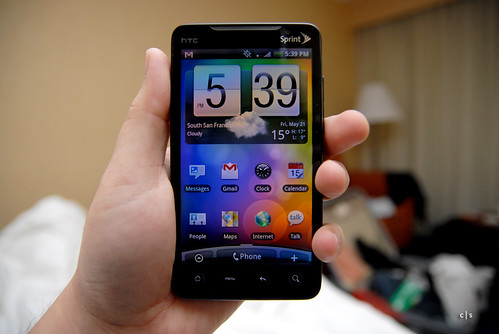
I just came back from Google IO 2010. It is awesome developer conference. Each attendee was given Nexus One , HTC Evo 4G, and of course Google TV Socks :) HTC Evo 4G is amazing device.

HTC Evo 4G

I got home, hooked the Evo to my PC and found that my Windows machine did not recognize it. I managed to find the solution in Android Developer Google Groups, you can read it here. We basically need to modify the entry in android_winusb.inf to add the VID and PID of HTC Evo. You can download the modified android_winusb.inf from here (right click on the link and select save as).

Monday, December 14, 2009

IEC Christmas 2009 / Projector Calibration

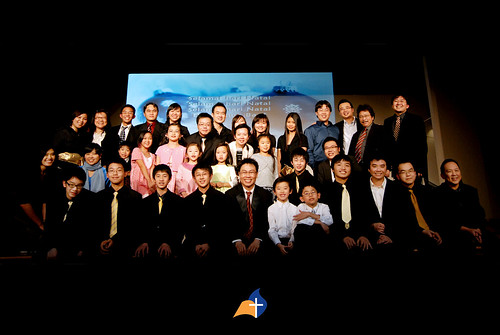
We just finished with our church Christmas Celebration, it was tiring, but it was worth it. We had wonderful team working together to serve God in this event. Great job guys and gals!


GII Christmas 2009 Crew

I would like to share one challenge we encounter in the visual presentation team. The challenge actually starts last December, but I just write about it now. Last December, we are asked to utilize projector for helping audience to virtualize settings in the drama, since we do not have any physical stage decorations. So far so good, we just create the contents and display them using appropriate program. Ideally, we will have something like the following.


Ideal Projector Placement (credit to Martin for the illustration)

However, we could not implement the ideal projector placement. We have problem hanging the projector, as we do not have skill to build custom mounting bracket that could be hang on the curtain's rod (i.e. we rent the building, so we could not mount anything on the wall). Ehm...trouble, fortunately, I found an idea that we could use. If I could put the projector on the side and adjust the perspective, I could achieve larger projection size without obstructing drama/choir people and I do not have to hang the projector at the top center. In short, the program development is started right away and the first version is used last December, unfortunately, with a lot of bugs :(


Implemented Projector Placement (credit to Martin for the illustration)

In the initial release, the ideal perspective could not be achieved, because I only consider translation, scaling, and skewing. I miss rotation. Hence, on last December event, half of the projection image looks ok, the other half looks stretched :( Moreover, there are heavy memory leak on the program at that time as well, so video playing is pretty bad.


Image on the left side is ok, but it is stretched on the right side

Time passed, the program is still used on Easter, but this time we avoid placing projector at extreme angle to avoid rotation problem I mentioned above. We are ok this time since the building we rent has enough space that allow us to do rear projection, and we also put another projector on the balcony. In total, we used three projectors: two projectors for rear projection to form 2048x768 resolution, and one projector on the balcony, mainly used for subtitle and video (i.e. projector calibration is disabled on this projector).


GII Easter 2009 Celebration

This year, we are renting the same building as last year. Ehm...I am pretty scared when hearing about this. I suggest to the stage coordinator (ko Hendri) to find a way to mount the projector on top at the center of the stage.

In the mean time, I try to go through my program's code to perform various improvements, I also added rotation as one of the variable when adjusting the perspective. I fix most of memory leak, but I am sure there are still some that still exist. I do not have enough time to dig into this. However, we are able to handle video playing at 1024x768 without any problems.

So I notify ko Hendry and do demo to show that the program could be used again this time. He agreed and then we proceed with it. We do however need to rent a projector with 4000 ANSI Lumens, since our projector could not handle it (ie. 2500 ANSI Lumes).


2009 GII Christmas Celebration (Image Courtesy of pak Felix Teja)

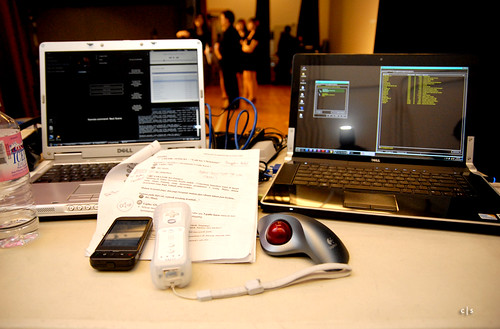
That's it, I forgot to mention that everything is done in Flash, which could easily top up CPU usage. Machine on the left (gray machine) is used as controller for both audio and video. Machine on the right is running the projector calibration program only. It is being controlled via socket by the gray machine. I used my Android G1 to remote control the audio and WiiMote to remote control the projector calibration program. It is possible to control everything just with mouse and keyboard, but I am more comfortable with this setup.


The Machines

For the next version, I am planning to bring everthing to OPENGL, GPU could give better horse power especially when we want to play HD video.

That's it for now.
Tuesday, October 27, 2009

Android 2.0 aka Eclair is Here

Waow, Android 2.0 SDK is just released. It now supports RFCOMM Bluetooth, which is great for peer to peer communication. WIFI is great but it does not work when you want to establish communication with other devices in WIFI-less environment. I also could not depend too much on 3G, in some areas, it is very slow and sometimes it does not even exist.

Monday, October 5, 2009

Automating inDesign for Repeating Content and QR Code

Our church is going to hold Bible Camp this coming week. We are all getting busy preparing for this event. I am responsible for creating publication materials, such as event booklet, brochure, name tag, etc.

Creating name tag might sound easy, but how about creating name tags for 50 persons. It will be painful to do it manually, copy and paste the layout plus typing names fifty times. So, I did some reading on Adobe inDesign documentation and found out that it's possible to create placeholders for repeating content using XML. Here is the article that I used. I just need to design the name tag, generate XML data for all attendees using Perl script, import XML to inDesign, and inDesign will do the rest of the work.

Generated Output by inDesign

Notice above figure, there is small box on the right of each name. It is QR Code containing information for each person. I was thinking that since I am going to automate the name tag creation process, why not adding some extra information. I decided to add QR Code and our team decided to add color coded group information (i.e. person with the same color belong to the same group).

Bible Camp GII 2009 Name Tag

I wrote a PERL script for grabbing contact information of each Bible Camp 2009 attendees from our church database and use GD-Barcode module to generate the QR Code associated to each individual.

Most people nowadays have phone with built-in camera, and most of them can decode QR Code. So, I think this as a good way for letting people to exchange their information with each other easily during our Bible Camp event. That's it for now. Following QR Code contains our church contact information.


Decoded Message on Android

Tuesday, September 29, 2009

Alkitab for Android Phone

Holy Bible in Indonesian is called "Alkitab". I am currently using Android Developer Phone 1 as my main phone, and I cannot find any "Alkitab" app yet on the market. I knew that Alkitab app exists for iPhone and J2ME platforms. Hence, I decided to develop one myself. Please keep in mind that the content of "Alkitab" is copyrighted by Lembaga Alkitab Indonesia (LAI).


You can download the apk file from here. For instruction on how to install .apk file into your Android phone, please go to this link. I am using Apps Installer from Android Market to install apk file from sdcard.

After application installation is done, please go here to download the database. You need the database to run the application. After you obtained "alkitab_db.zip", perform following steps:
  1. Connect your phone to your PC using USB cable and mount the sdcard
  2. Extract "alkitab_db.zip" to root folder of your sdcard. After extraction is done, you should see folder "alkitab_db" at your sdcard root folder
  3. Unmount your sdcard by clicking "Turn Off USB Storage" on your phone
  4. Start the application.
I will explain features available in this initial version.

Text Filter (on Android device with physical keyboard)

Type in the text using keyboard and the list will be filtered accordingly.


Gesture Motion

When you are in chapter or verse screen, you can swipe you finger on the screen to move between books/chapters. Swipe to left will bring you to the next book/chapter, swipe to the right will bring you to the previous book/chapter.


Search for Chapters/Verses

Clicking menu button will allow user to select this feature. This feature is used to search for chapters or versions in the bible, following are accepted input patterns:
  • [book] [chapter], Mazmur 3
  • [book] [chapter]:[verse], Matius 3:15
  • [book] [chapter]:[start_verse]-[end_verse], Kisah Para Rasul 1:3-5
  • [book] [start_chapter]:[start_verse]-[end_chapter]:[end_verse], Yohanes 10:5-11:3
  • [book] [start_chapter]-[end_chapter], Lukas 5-10
  • [book] [start_chapter]-[end_chapter]:[end_verse], Roma 3-5:13


Search For Word

If the search input does not match any of Search for Chapters/Verses patterns, the input will be used as keyword to search for match words in the bible. Searching using keyword feature will require the phone to send request to remote server instead of searching through local database. Local database is flat file database and it will take long time to find the match keyword. If you do not want the phone to connect to Internet, do not use the search for word feature.


That's it and I hope the app can be useful for everyone. Email me closari[at]gmail if you encounter bugs or have suggestions for improvement.

Android 1.6 Image for Android Developer Phone

HTC finally released Android 1.6 image for Android Developer Phone, available here.

I have upgraded my phone and now it's running Donut.


I haven't check all the features yet. One thing I noticed is that the camera/camcorder app has new user interface and it's faster compare to previous versions.


I also noticed in Settings, Speech Synthesis is added as part of the Settings items. However, it lacks of Indonesian language. So far I have been using Eyes-Free for performing TTS on my application. Their packs include Indonesian as one of the available languages. I am not sure why Google did not include Indonesian in 1.6, since the TTS service in 1.6 is basically derived from Eyes-Free project.

That's it, I will start playing with new gesture recognition feature added in 1.6.

Saturday, September 19, 2009

Android Developer

I found this in goodies section at android.com. It's pretty cool. It's almost one year now since I started writing applications for Android.